
Booking.com offers great ways for South Africans to save on local and international travel. Understanding how to use booking.com promo codes, coupons and vouchers can help you unlock serious savings.
There are two main types of discounts available on Booking.com:
1. Personalised Booking.com Promo Codes & Vouchers (Sent via Email or App)
These are exclusive, single-use codes sent directly to you after certain stays or promotions.
Key Details:
- How to get them: Usually sent after completing a stay or as part of a targeted campaign.
- Minimum spend: Typically, R1,100.
- Maximum reward: Usually 10%, up to R2,100 credited to your Booking.com wallet after your stay. Credits only apply for a defined period.
- Where to enter the codes: Enter the code at the final step of checkout under the “Promo Code” section.
- Stackable: Can be used alongside Genius discounts.
- Expiry: Short validity – often just a few days, so act quickly.
2. Generic Booking.com Promo Codes & Travel Discounts (Codes/links further below)
These are public discounts available to users, but only on selected properties. They’re perfect to save without needing a personalised code.
How They Work:
- No minimum spend for most properties. Maximum discounts can be much higher than the personalised codes.
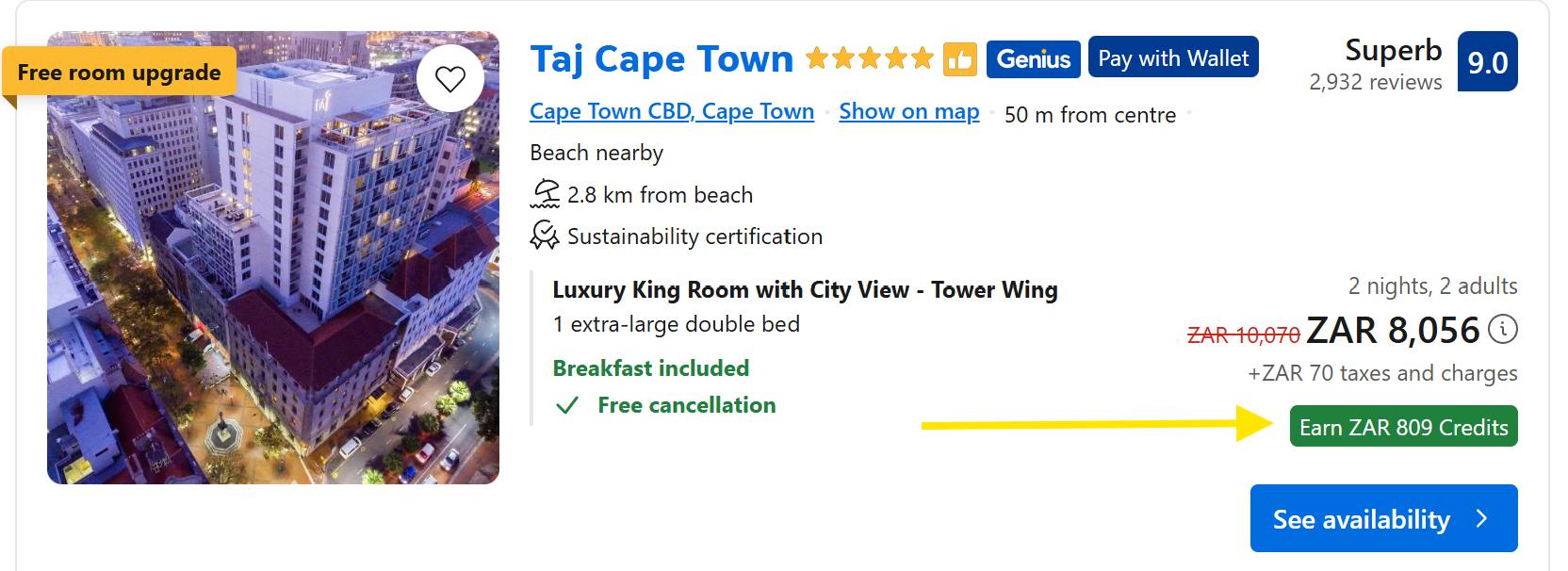
- Look for the Green Discount Blocks (credits or instant rewards) on listings – this indicates the discount is active. If you don’t see any properties with Green Blocks, ensure your dates are correct, and try a different browser/incognito mode. Promotions may be limited to certain properties or may have expired. See an example of the Green Block further below.
- Types of discounts: Some are instant (applied at checkout), while others are travel credits added to your account after your stay.
- Stackable: Can be combined with Genius discounts. Ensure you are logged in.
- Important: These discounts may not work on the Booking.com app – use the desktop website instead.
- No code needed at checkout – the discount is automatically applied when using the correct link.
General Booking.com Tips for South African Travellers
- Compare different Booking.com platforms: Prices can vary between the Booking.com app, desktop site, and partner links. Always compare before confirming your booking.
- Get Genius Status Faster:
- Genius Level 3 offers the best perks (like free breakfasts and bigger discounts).
- To reach Level 3, complete 15 bookings within 2 years.
- Genius status is lifetime once achieved.
- Book each room as a separate reservation to count each one.
- Ask friends or family to book under your profile to boost your count.
- Flights, car rentals, taxis, and attraction bookings also count (check T&Cs for exclusions).
- Watch out for card fees: Some South African banks (e.g. FNB) charge a 2% or more forex fee even on ZAR bookings.
- Be cautious with “Pay Later” options: If you book in a foreign currency and choose to pay later, the final Rand amount may change due to exchange rate fluctuations.
- Always read the fine print: Some vouchers offer cashback instead of instant discounts and may have usage limits or exclusions.
Booking.com current Promo Code links – How to Use Booking.com Promo Codes:
These discounts apply only to selected properties. Make sure the green discount block appears when browsing. Always use the desktop website, not the app.
| Discount Type | Discount % | Max Discount | Redeem before | Stay Until | Link |
| Travel Credits | 10% | €300 | 30 June 2025 | 30 June 2026 | |
| Travel Credits | 10% | €1,000 | 30 June 2025 | 31 Dec 2025 | |
| Instant Discount | 8% | — | 31 May 2025 | 31 Dec 2025 | |
| Instant Discount | 6% | — | 31 May 2025 | 31 Dec 2025 | |
| Travel Credits | 10% | AUD 321 | 30 June 2025 | 31 Dec 2027 | |
| Travel Credits | 7% | €200 | 30 June 2026 | https://www.booking.com/index.en.html?aid=2440045 | |
| Travel Credits | 7% | €200 | 31 Dec 2025 | 31 Dec 2025 | https://www.booking.com/gating/authkey?aid=2439504&key=mjB3VcxhAl |
| Travel Credits | Around 10% | € 500 | 31 Dec 2025 | https://www.booking.com/gating/authkey?aid=2400291&key=Nbtyi4S0Hs&label=am |